Audience Insights & Segment Intelligence
The Audience Insights module in DriveMetaData provides deep diagnostic intelligence for saved customer segments. Rather than treating an audience as an opaque list of IDs, Insights reveals who your users are, how they behave, where they drop off, and how viable the cohort is for third-party ad activation.
1. Module Overview & Business Outcomes
Audience Insights helps growth marketers, analysts, and campaign leads make data-backed decisions prior to committing advertising budget:
- Pre-Flight Campaign QA: Confirm whether your audience has sufficient reachability and purchase intent before syncing to ad platforms.
- Discovering High-Affinity Sub-Cohorts: Uncover unexpected demographic clusters (e.g., discovering 80% of cart abandoners originate from two specific cities).
- Detecting Audience Fatigue: Identify segments experiencing high ad exposure or recency decay.
- AI-Guided Decision Making: Receive prescriptive "Next Best Actions" generated directly from cohort characteristics.
2. Prerequisites, Entitlements & RBAC
| Requirement | Description |
|---|---|
| Audience State | The audience must be Saved or Estimated with a valid ID . |
| Viewer Role | Inspect existing insight cards, size trends, and diagnostic tabs. |
| Editor / Admin Role | Trigger insight recalculations, accept AI recommended actions, and execute activation handoffs. |
| Data Freshness | Behavioral and commerce insights require that raw telemetry events have synced within the last 24 hours. |
3. Product Workspace Anatomy
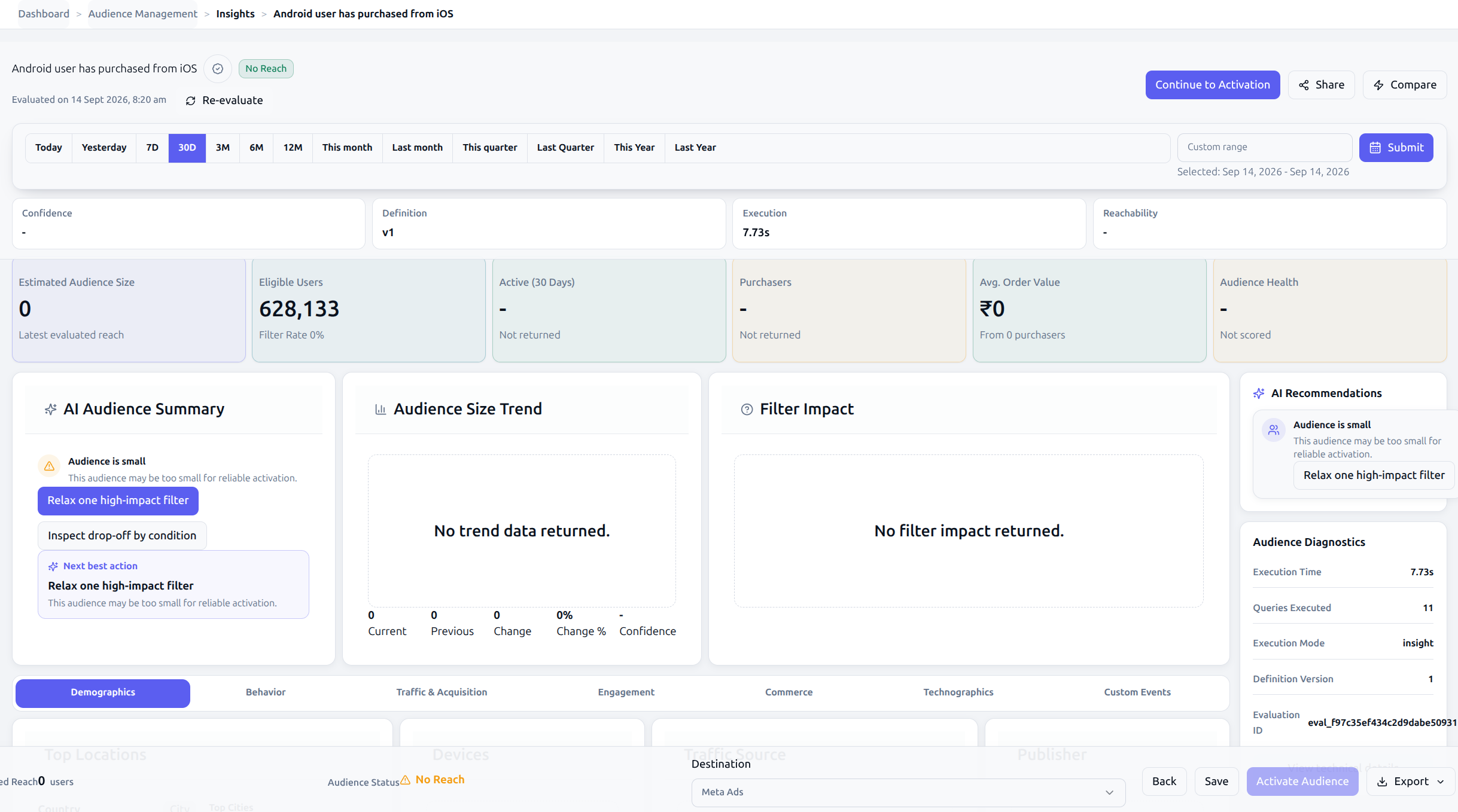
The Insights screen is organized into high-impact diagnostic panels:
4. Canonical Step-by-Step Walkthrough
Step 1: Navigate to Insights
- From the Audience Builder, click the More actions (⋮) menu in the header and choose View insights.
- Alternatively, navigate directly via the route:
/insights/[audienceId].
Step 2: Review the Operating Context Strip
At the top of the page, review four core indicators:
- Confidence: High, Medium, or Low statistical confidence in the computed cohort metrics.
- Definition Version: Confirms which rule version (
v1,v2) was used for evaluation. - Execution Duration: Real-time analytical query time against ClickHouse (typically 150ms–450ms).
- Reachability Rate: Percentage of profiles possessing verified identifiers eligible for third-party sync.
Step 3: Evaluate AI Summary Cards & Next Best Action
- The AI Audience Summary highlights significant positive drivers and operational risks.
- Review the highlighted Next Best Action card (e.g., "Trigger WhatsApp Cart Recovery Campaign").
- Click the recommended action buttons to route directly to campaign creation or destination syncing.
Step 4: Analyze Historical Size Trend
- Inspect the Audience Size Trend chart displaying the last 6 execution runs.
- Confirm whether audience membership is growing, stable, or decaying over time.
- Review the Current vs. Previous comparison metrics (
+6.3%) to detect sudden anomalies caused by seasonal shifts or tracking drop-outs.
Step 5: Diagnose Drop-Off via the Filter Impact Funnel
- Scroll to the Filter Impact panel.
- Trace how each condition card in your audience definition reduced the baseline customer population.
- Review the Biggest Drop-off card to pinpoint which specific exclusion or inclusion rule removed the largest percentage of users.
Step 6: Explore the 7 Diagnostic Breakdown Tabs
| Tab | Key Visualizations | What to Look For |
|---|---|---|
| Demographics | Top Countries, Top Cities, Device Platform Donut, Publisher mix | Geographic clusters and mobile vs. desktop skew. |
| Behavior | Purchase Intent (Purchasers %, Avg. Order Value, Event Depth), Recency Risk, Activation Guardrails | Conversion readiness and churn risk before campaign launch. |
| Traffic & Acquisition | Inbound Source Mix, Publisher Concentration, Top Inbound Campaigns | Dominant acquisition channels feeding this audience. |
| Engagement | Event Frequency, Session Depth, Activity Heatmap | User activity volume across weekdays and hours. |
| Commerce | Average Order Value, Repeat Purchase Ratio, Product Category Affinity | Merchandising opportunities and basket size trends. |
| Technographics | Operating System (Android vs. iOS), Browser, App Version | Technical compatibility for deep-linking and push notifications. |
| Custom Events | Custom Telemetry Trigger Frequency, Feature Adoption | Tracking-specific milestones and workflow completion. |
5. Operational Guardrails & Data Governance
- Cohort Sample Ceiling: If an audience contains fewer than 50 qualifying users, the insight engine flags the analysis as Low Confidence to prevent marketing teams from generalizing on statistically insignificant sample sizes.
- Reachability Threshold: If the Reachability Rate drops below 40%, an Activation Guardrail badge (
warning) is triggered, advising operators that paid ad network match rates will be severely degraded. - Stale Insight Invalidation: If the audience rules are modified in the Audience Builder, the backend definition version increments, immediately flagging current insight metrics as Outdated until recomputed.
6. Troubleshooting & Error Playbook
| Symptom | Probable Root Cause | Actionable Resolution |
|---|---|---|
| Error: "Audience definition not found" | Invalid audience ID in the route URL or audience was deleted in Postgres. | Return to Audience Management and select a valid saved audience. |
| Trend chart displays "No trend data returned" | Audience was created recently and has fewer than two historical execution runs. | Trend data will automatically populate after subsequent evaluation or scheduled sync runs. |
| Reachability Rate shows 0% | Customer profiles in this segment lack mapped identity columns (Customer.email, Customer.mobile). | Check data source connections and identity resolution mappings in your CDP configuration. |
| Insight query fails with 504 Gateway Timeout | Complex nested filter across billions of event rows without lookback bounds. | Edit the audience definition in Audience Builder and add a time window constraint (e.g., in last 30 days). |
7. Downstream Handoff & Next Steps
- Audience Activation: Deploy your verified segment to Google Ads, Meta Custom Audiences, or TikTok.
- Channel Performance Guide: Measure cross-channel ad spend, revenue, and CPA attribution across your active channels.
- Campaign Module: Attach this audience to automated omnichannel messaging journeys.
- Audience Insights API Reference: Review the JSON contracts powering
/insight.